
Adobe Illustrator is a pretty powerful tools and it offers some pretty unique features. Worth surfacing is Illustrator’s Paintbrush Tool (B). Illustrator brushes can be applied to paths and strokes and as you probably know they are excellent for creating unique stroked designs in seconds.
Illustrator’s brushes are all vectors and can be completely modified to suit your needs by changing most of their characteristics like e.g stroke width, weight, colors, and more. The power of Illustrator brushes is often underestimated and Illustrator brushes are a lot less around than Photoshop brushes.
If you like Illustrator, make sure to check out the fully-licensed Illustrator addons and brushes found over at Envato Market.
I have looked all over the web to collect the best Illustrator brush sets for you. So below you will find more than 75 beautiful Illustrator brush sets for improving and speeding you design process! Do you miss some brush sets in the collection? Drop a comment for us and it will be added. (Post has been updated May 17th 2012)
[exec]$filestr = file_get_contents(‘http://www.tripwiremagazine.com/googleadsensebelowmoretag.inc’);echo $filestr;[/exec]
Disclosure: Please note that some of the links below are affiliate links and I will earn a commission if you purchase through those links (at no extra cost to you). I recommend that you do your own independent research before purchasing any product or service. This article is not a guideline, a recommendation or endorsement of specific products.
Border, Ropes, Chains And Decor Brushes

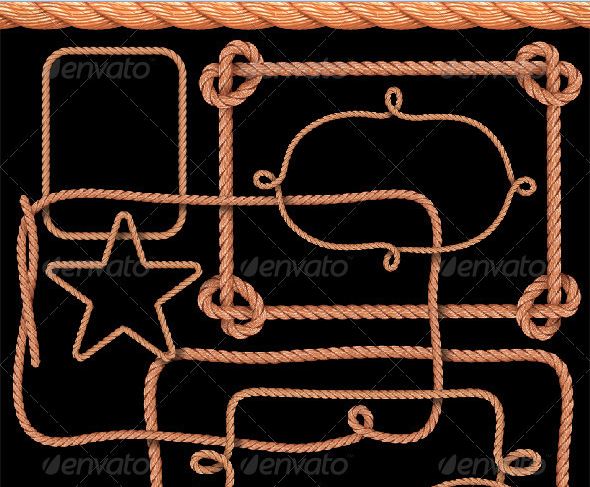
Rope Pattern Brush and Ready-Made Rope Elements
by GraphicRiver (premium brushes)

by GraphicRiver (premium brushes)
by GraphicRiver (premium brushes)


Illustrator Brush Sets – Swirl, Floral and Foliage
5 Broken and crumbled leaves brushes


by GraphicRiver (premium brushes)
Fresh Flower Illustrator Brush set
28 Free Illustrator Brushes for Making Swooshes and Swirls
FloresBeck Illustrator brush pack
20 Ridiculously Cool Hippy Flowers
Various nature illustrator brush collection
Custom brushes collection
Free Illustrator Symbols – Swirly Curls Ornaments
Floral Brush Kit for Illustrator
Hand drawn, Paint, Ink and Watercolor Brushes

by GraphicRiver (premium brushes)

by GraphicRiver (premium brushes)
Urban Squares Illustrator Brushes
230 Free Vector Marker Brushes
Free Illustrator Brushes: Ink/Watercolor
90+ illustrator Watercolor Brushes
Smoke Illustrator Brushes
Smoke – illustrator brush pack
Gems, Beads and Pearls Brushes for Illustrator
String of Pearls Layered Brushes Set

by GraphicRiver (premium brushes)
Snowflake and Starburst Brushes
Illustrator Snowflake Scatter Brushes
Abstract Brushes
Starwalt Abstract Illustrator Brushes
Other Illustrator Brush Sets

by GraphicRiver (premium brushes)

by GraphicRiver (premium brushes)
Geometric elements – illustrator brush set 1
Various symbols – illustrator brush set 3
Various useful illustrator brush set 2
Illustrator Brush Tutorials
Create Illustrator Art Brushes
Excellent tutorial showing how to make use of brushes in illustrator to paint a beautiful women character
This is an advance tutorial, tools used include Pen tool, convert anchor point tool, ellipse tool, eyedropper, gradient tool.
Palettes used include Layers, Brushes, Swatches, Gradients, Pathfinder, Transparency
Adobe Illustrator Tutorial Making waves of lines
Thank you for visiting Tripwire Magazine. Don’t forget to share this post with your friends.

Sonny M. Day is a passionate SEO and web design enthusiast who loves photography, mountain climbing, snorkeling and dirt bike riding.



thankkk youu!
All the brushes here is what I am looking for. Thanks for your hard work write this list, very useful for me.
Great collection, wish they all were free for commercial use, but still some goodies!
thanks
Thanks so much for these brushes. They are awesome. Do you happen to have a twisted wire brush? I have tried and tried to make one, and I’m doing something wrong and need one very bad for a website I am making. Thanks again!
Nice collection of brushes which I’m going to bookmark. It’s got everything I need, the lace brushes saved me a lot of time with a project I’m working on.
Thanks!
Hi
I downloaded some of your brushed.
But not yet added in presetsbrushes.
I think it will work in good actions.
Thanx a lot
Ashok Classic
I’m sorry to let you know, but when I click on the “46 Royalz swirl illustrator brush set”-link, DeviantART tells me that it doesn’t exist..
But; I really appreciate it that you put your effort in this. 🙂 Thank you so much!
Hi Melissa, ??thank you ?for letting us know about the broken link. I’ve just been searching the net for a new link to replace the old one, but it seems like the brush set does not exist anymore from the designer. Therefore I have now removed the link from our article. Hope you will find another brush set that meets your needs!
Best regards,
Sofie
Thanks a lot for sharing resource …. its awesome 🙂
thank you so much sonny
Amazing set of brushes. Have really helped on the project I am am doing which I need a water colour effect in Illustrator!
Thanks again
Dan
Thanks – these are awesome but I think I must be doing something wrong – when I click on download, they download ok but as .rar files… I’ve tried changing to .ai but neither works… help please what am I doing wrong?
:-y
Hi Anna
Rar is a compression archive just like zip. You need to use a .rar compatible client. More into here: http://www.rarlab.com/ – http://www.rarlab.com/download.htm
I couldn’t download ???
these are awesome!!!
hello
How are you?
Sonny, cool effects with brush sets! For those who design for prepress, Markzware did a tutorial video on how to save an Adobe Illustrator file for prepress usage.
Thanx. Nice info.
Am familiar with Photoshop & have just started using Adobe Illustrator. These resources will surely help. Thanx Again.
Thanks for the information. 🙂
i love these of all creative brushes, also would like to share with my designer friends as well. thanks
hey, awesome! thank you. I was looking for it. : )
After downloading the brushes, which will likely download to some Internet temp file location, copy and paste the AI file into your brushes folder, under Local Disk>Program Files>Adobe>Adobe Illustrator CS5>Presets>en-US>Brushes folder. The “Brushes Library Menu” button on the brushes menu in AI will automatically pull up all files (brushes) saved in that location.
Hope that helps. 🙂
Hate to be a dope, but how do you add brushes to CS5?
[…] Enlace: Sets Brushes Para Adobe Illustrator […]
[…] TripwireMagazine publicó una excelente recopilación con mas de 79 brushes para Illustrator. […]