
I recently had put myself in a situation where I had to delete just about 10.000 posts in WordPress in a specific category.
The reason for this was the design of the community link on tripwire magazine. At the time when I created it I thought it was an OK solution to add posts into a category only used for community submissions but as more and more people started using the feature I found that WordPress where literally becoming flooded with these posts and I spent too much time locating my own articles.
I have been motivated to change this for month but lately I decided to migrate to the Headway theme (see review here) I thought the timing was good as I didn’t want to do too much tweaking in the theme to hide the community posts in all the post listings (front page, category lists etc.). My problem was how to actually get rid of all these posts and after trying different options I ended up coding my own SQL that I share with you in this post.
Why is this even worth a post? Well I ran into a lot of requests from people trying to get this done in an efficient way but there where no solutions.
[exec]$filestr = file_get_contents(‘http://www.tripwiremagazine.com/googleadsensebelowmoretag.inc’);
echo $filestr;[/exec]
I considered and experimented with different options. The most obvious way to delete posts in WordPress is of cause to use the administration area but if you have many posts to delete if may take many hour. In my case 10.000 posts seamed to be overwhelming (close to 670 deletes of the 15 posts showed on one page in WordPress admin).
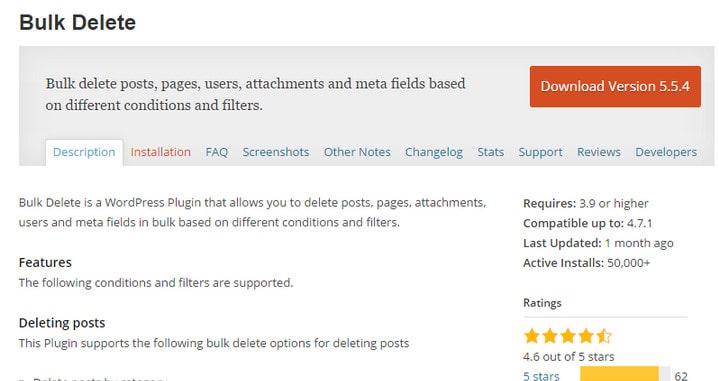
Bulk Delete WordPress Plugin
I decided to look for other and much easier solutions and I ran into Bulk Delete. Bulk Delete is a WordPress Plugin which can be used to delete posts in bulk from selected categories or tags. This Plugin can also delete all drafts, post revisions or pages.
So when there’s a plugin out there that seams to do the trick why didn’t I use it? Basically because I experienced some problems with it and never got it to work on my production site. The plugin rely (as far as I know) on the same functions that WordPress use when you delete a post through the admin. This sounds great right but it will put a lot of load on your server to process 10.000 posts and I ran into problems with memory and timeouts when I tested it.
SQL specifically designed to delete all posts in a WordPress Category.
OK so I had to look for other options. I normally find what I need for WordPress after a few minutes of searching Google but this time no solutions came up. I then decided to write a SQL script specifically targeted at deleting all posts in a Category in one efficient execution. I worked as a developer years ago but still it wasn’t that easy for me to crack the problem and I guess other can benefit from this.
WARNING USE THIS SCRIPT WITH CAUSION AND ONLY AFTER BACKING UP YOUR DATABASE! USE AT YOUR OWN RISK.
How to use it:
Step 1:
Log into your phpMyAdmin and locate your WordPress database
Step 2:
Press the SQL tab and fire off this SQL to make sure the right posts are selected. You need to add the target Category Id in stead of <category id> in the script. The script should select all the meta data WordPress collects for a post. You can check out the database ER diagram here that I used.
SELECT *
FROM wp_posts a
LEFT JOIN wp_term_relationships b ON ( a.ID = b.object_id )
LEFT JOIN wp_postmeta c ON ( a.ID = c.post_id )
LEFT JOIN wp_term_taxonomy d ON ( d.term_taxonomy_id = b.term_taxonomy_id )
LEFT JOIN wp_terms e ON ( e.term_id = d.term_id )
WHERE e.term_id =<category id>
OK so if you’re OK with the posts being selected you fire off this script. It deleted my 10.000 posts in less than a second. But be careful if you choose the wrong category you will not be able to get your posts back unless you restore from backup! The script will clean up all the metadata in the tables: wp_term_relationships, wp_postmeta, wp_term_taxonomy, wp_terms where I had hundreds of thousands of records. It is quite important to get this cleaned out
delete a,b,c,d
FROM wp_posts a
LEFT JOIN wp_term_relationships b ON ( a.ID = b.object_id )
LEFT JOIN wp_postmeta c ON ( a.ID = c.post_id )
LEFT JOIN wp_term_taxonomy d ON ( d.term_taxonomy_id = b.term_taxonomy_id )
LEFT JOIN wp_terms e ON ( e.term_id = d.term_id )
WHERE e.term_id =<category id>
Hope you will find this guide and the script useful and please leave a comment if you have any suggestions or comments on how to improve it.

Lars started tripwire magazine back in January 2009. He is really passionate about web design, web development and loves to look into new technologies, techniques, tools etc. and to write articles for his readers.



Thanks for this useful post, this will save me huge time,
What if I want to delete all my 80k posts and thousands of uploads from database but keep pages and categories?, thank you.
I use feedwordpress to bring in hockey related news to a CPT, and it freaked out recently. I had 25000+ matching posts show up. Everything I tried would completely crash my WP install. Your bit of code above wiped everything out in seconds, with no trouble
Alittle useful detail: when delete old posts with the query in wordpress admin categories page (or taxonomies page) the number of posts remain the same. But the posts were deleted. You have to use this query in order to put that number to zero:
UPDATE `wp_term_taxonomy` SET `count`=0 WHERE `term_id`=
(the posts count is a value setted in wp_term_taxonomy table in count field)
I hope this help
In addition to my comment above: the SQL query someone might use in order to get the orfan rows in wp_terms_taxonomy deleted unintentionally is: SELECT * FROM wp_terms LEFT JOIN wp_term_taxonomy ON wp_terms.term_id = wp_term_taxonomy.term_id ORDER BY wp_term_taxonomy.term_id The first rows have NULL in right table columns. This means that in wp_terms resides some rows without correspondings in wp_terms_taxonomy. I think these rows could be deleted from wp_terms and recreate other in place. One more time: the query you posted it are of high use. I could delete thousands of records and deliver my project in time after tested it.… Read more »
Many thanks for very useful tutorial. The SQL query built in order to delete posts from specific category (or taxonomy) save me in the middle of debugging a plugin I worked on. I have to make a little note on that: if you include d (wp_term_taxonomy) in delete a,b,c,d…. someone will delete the row in wp_term_taxonomy coresponding to category id; this fact will cause you can’t use that category anymore. wp_term_taxonomy include taxonomy type (category, tag, custom taxonomy for custom post type, etc), the parent of taxonomy, the number of posts associated with that taxonomy, the description of taxonomy, etc… Read more »
Seriously helped me remove 6, 795 posts from my blog.
Now it is clean site but i don’t know if i will get hurt by google or not ;(
and what about this? 🙂 I think it’s much faster…
delete FROM wp.wp_terms;
delete FROM wp.wp_term_taxonomy;
delete FROM wp.wp_term_relationships;
delete FROM wp.wp_posts;
delete FROM wp.wp_postmeta ;
This is super awesome stuff. I was pretty frustrated as it was a daunting task for me to delete few hundred posts which were old from my site. Your query was bang on target.
Thanks for sharing.
This query also dletes category along with posts…can you please help
Hi, I have been looking for this piece of code for a long while now. So glad I found it. I have tried it out on an unimportant category on my website and found that when searching for the posts with the select query and a date criteria that it did indeed find all of the posts in that category posted before that date.
HOWEVER, when I ran the delete query, using the last line
WHERE e.term_id =122 AND post_date <'2013-01-01'it deleted everything posted in that category, and th category itself. Any ideas?Is there anybody out there who can help me out with this issue?
Thank you for the great post! It’s saved a lot of my time.
Thanks, I will keep this one handy for my development production dbs!
Thanks a bunch. I’m trying to figure out how to edit this so that the category is not deleted along with everything else.
Very useful LARS.
Thanks for sharing this nice tutorial I saved my lot of time after reading this.
1 more thing, I want to delete my all post WHERE post_status=’drafts’. But the problem is I am not able to delete other meta information’s.
Can you please help me to write this SQL query.
thanks in advance
I got this error for first Query!
#1064 – You have an error in your SQL syntax; check the manual that corresponds to your MySQL server version for the right syntax to use near ‘ LIMIT 0, 30’ at line 7
This is undoubtedly an important post for me, but I stuck at one point.
I implement the code on the sql server and the same screen appear before me too, but I didn’t catch up your words. What did you mean by fire off the script? Can you please explain this.
Thanks for this! Saved me a lot of time. I have been struggling with even very good/fast servers trying to delete a few hundred records at a time… now 1000 custom post-type records with 1/2 million child records gone in about a second. What on earth do the WordPress bulk delete routines do and how can they be that inefficient?!
Simon
This is very very useful. Is it possible to delete multiple category id’s with this code? So instead of changing the code for each ID, just list them one after the other?
Great site you have got here.. It’s hard to find high-quality writing like yours nowadays. I really appreciate individuals like you! Take care!!
Great help but do you have a suggestion for also deleting all the comments attached to the posts being deleted? Those will be left behind in the db.
Thanks for the post, it really help me to solve my WordPress mass delete issue.
I liked your article is an interesting technology thanks to google I found you
Great work? it is helping me understand sql better. Question for you though this script also deleted the category. any way to keep categories and sub categories intact? The reason why I ask is I am using a feed to populate a car dealers site. But on cron I would like all posts to be deleted then reloaded. that way when they sell a car it doesn’t stay on the site…. Also why checking for duplicates doesn’t work. I have tried may different variations of your code and nothing seems to get it right so far. (without deleting everything) Any… Read more »
[…] ed ha risolto prima di me il problema in maniera semplice ed elegante, per questo motivo segnalo il suo articolo e mi appunto qui la preziosa stringa SQL. E’ proprio vero che prima di fare qualsiasi altra […]
[…] on that many posts. Nothing was working. It took a pretty strong dose of Google-fu to finally come across this post from Lars over on Tripwire Magazine. This was exactly what I needed, and it worked perfectly. […]
Yup, you just helped me tremendously. I use feedwordpress to bring in hockey related news to a CPT, and it freaked out recently. I had 25000+ matching posts show up. Everything I tried would completely crash my WP install. Your bit of code above wiped everything out in seconds, with no trouble. I’ll be using your post over on VoodooPress for my followers, it is very helpful. I hope that’s cool? I will credit you as the source of course!
Great to hear that I helped you out here Voodoo!
Very useful. I’ve been hacking at my SQL joins for two days now trying to figure this out. Thanks much!
You are welcome Dan… SQL can be tricky sometimes I know 😉
How about 57,000 posts in approximately 15,000 categories?
How about over 200,000 posts in over 45,000 categories…it works fine. Wouldn’t matter if it was a billion posts in a million categories. SQL doesn’t care about your numbers, all you need is patience 🙂
Wow, thank you! Total lifesaver.
Thanks Any! I also checked out your site. I’m sure it is a lifesaver for many people that are new to blogging. Good job you are doing there.
Is there a way to delete post content older that 90 days but leave the title and exceprt in tact?
I’ve got a slightly different issue and could use some help. I’m willing to pay if you accept bribes :).
I have a category that has hundreds of subcategories (and sub-sub categories). I want a script that can mass reassign all the subcategories to the main category.
Please let me know if you can help!
Regards,
Marshall
Marshall, I don’t think it is that difficult, but I don’t have the time right now to do it for you. You can use this ER-diagram to understand how the database is structured.
Excellent post guys, I was a bit reluctant to just delete from the wp_posts table and this was exactly what I was looking for.. thanks for sharing..
your welcome Peter, the right script for the job at the right time….;)
The bulk delete plugin does not work
Great post, thanks…
How do I delete posts posted before a certain date or number of days?
You need to use a where clause something like this: WHERE post_date < [certain date]
[…] Here is the original post: Mehrere Beiträge in WordPress auf einmal entfernen […]
Thanks for sharing, This will come in handy for Wp-o-matic posts that aren’t worth posting
It is too good work.here it consider time so it really useful to establishments great Thanks for sharing…
[…] This post was mentioned on Twitter by Web / Graphic Design, Creative in Links, Fredrik Christensson, Web Development News, Web Design Feed and others. Web Design Feed said: How to Effectively Bulk Delete many Posts in WordPress: I recently had put myself in a situation where I had to … http://bit.ly/ddJSre […]