
20 Most Popular Open Source Software Ever These days, you can quite easily buy a brand-spanking-new computer and install all the software you need for free, using applications offered under the Open Software License.
You can get a free image editor, a free sound editor, a free word processor, media player, file archiver, PDF creator… the list goes on and on and on. While some of these free apps do not offer quite the same level of polished functionality as their commercial rivals, others far exceed the capabilities of everything else on the market.
Below, we take a close look at the cream of the crop: 20 invaluable and indispensable open source applications that you really should be using, if you’re not already. The vast majority of them are cross-platform and absolutely 100% free! You’re bound to find several that are perfectly suited to your needs.
As you might have suspected, WordPress is #1 on the list, and for good reason! If you like WordPress Themes, make sure to check out the thousands of fully-licensed premium examples found over at Envato Market.
[exec]$filestr = file_get_contents(‘http://www.tripwiremagazine.com/googleadsensebelowmoretag.inc’); echo $filestr;[/exec]
1. WordPress
WordPress is the world’s most popular blogging platform, used by a staggering 202 million websites. As simple or as complex as you want it to be, WordPress is supported by a wide array of plugins which can be used to transform a standard blog into anything you could possibly desire. Besides blogs, WordPress can be used as a straightforward content management system to power anything from online shops using WordPress e-commerce themes, online magazine using a WordPress magazine theme to portfolios using WordPress portfolio themes, WordPress gallery themes are great for photographers and designers showcasing their creations in an online portfolio.
2. Magento

Magento, used by 30,000 merchants, including Samsung, Nespresso and The North Face, is the world’s fastest growing e-commerce platform. Magento Community Edition is offered for free under the Open Software License. The Enterprise Edition, for which you have to pay, offers features like multi-store capability, store credits and gift cards, out-of-the-box.
3. Mozilla Firefox

Firefox currently accounts for 24.43% of the recorded usage share of web browsers, but this figure is on the rise. Already the browser of choice for most web professionals, Firefox’s popularity is growing thanks to its vast selection of third party add-ons, which let users tailor their browsing environment down to the finest detail.
4. Mozilla Thunderbird

With its speedy searches, built-in RSS feeds, strong security and superb add-ons, Thunderbird has to be the best, free email application available. If you’re prepared to spend some time tailoring your email environment with add-ons, you’ll absolutely love it, but it’s probably not ideal for complete novices.
5. FileZilla
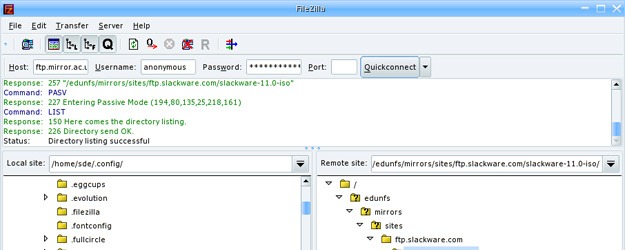
FileZilla is a hugely successful, cross-platform FTP client. It’s also available as a server, for Windows only. Created in January 2001 by Tim Klosse as a class project, FileZilla has gone on to become the 5th most popular download of all time from SourceForge.net.
6. GnuCash

GnuCash provides a great, free alternative to paid-for accounting software. Designed for personal and small business use, it offers bank account, stock, income and expense tracking, in addition to double-entry accounting.
7. Audacity

Music software like Cubase and Logic Pro can be incredibly expensive, which is why an increasing number of people are turning to Audacity, a free, cross-platform sound editor. Users can record and edit live audio; cut, copy, splice and mix sounds; and convert ageing tapes and records into digital format.
8. GIMP

Just like sound editors, industry standard image editing software is prohibitively expensive for a lot of people, but GIMP provides a free alternative. It performs every major function you could desire, except for, vitally, CMYK separation functionality necessary for prepress work.
9. OpenOffice

With the ability to create text documents, spreadsheets, presentations and databases, OpenOffice is an accomplished rival to Microsoft Office, which clearly influenced OpenOffice’s design. Microsoft Office users will feel completely at home and find that OpenOffice performs just as well, if not better.
10. VLC

At last count, VLC media player had been downloaded 300 million times. Unlike some paid-for alternatives, VLC supports practically every audio/video codec and file format. The most recent VLC release also offers live recording of streaming video, frame-by-frame advancement and superb speed controls.
11. Handbrake

Handbrake rips/converts DVDs to MPEG-4 for playing back on your iPod or archiving. It doesn’t have the ability to decode DVDs, but can do so if you have VLC, which includes a DVD encoder, installed on your computer.
12. Pidgin

Pidgin is the ultimate, free instant messaging tool. It provides you with one window through which you can simultaneously interact with different people, whichever instant messaging platform they’re using.
13. Freemind
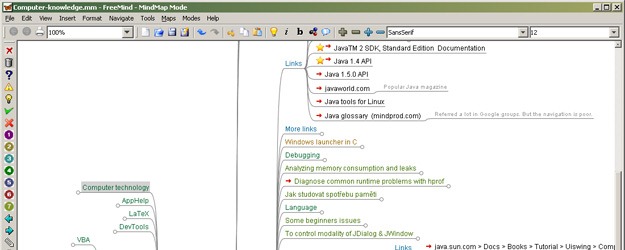
Freemind is a terrific mind-mapping tool, which lets you get all your thoughts down as quickly as possible with the use of icons, shapes and colors. Besides the ordinary nodes and links, you can add hyperlinks and even documents to your maps.
14. Notepad++

Reliable, customizable, intuitive and free, Notepad++ is the most popular Windows-based CSS editor around. It offers everything: syntax highlighting; folding and auto-completion for CSS, C, C++, C#, Java, JavaScript, SQL, HTML, XML and PHP; multi-file viewing; tabbed editing; zoom in/out; and bookmarks.
15. 7-Zip

7-Zip is an extremely popular file archiver for Windows, which, although free, outperforms Winzip. It can unpack the vast majority of archive formats and can create TAR and GZ archives, commonly used on Unix and Linux systems, as well as its own 7z format, which easily outshrinks ZIP files.
16. Blender

Blender is a 3D content creation suite which can be used for everything from modeling to skinning, particle simulation, animating and texturing. Unlike some other free apps in this list, Blender has not been designed to “imitate” other 3D graphics software, which means it takes a bit of getting used to, but once you’ve familiarized yourself with all the shortcuts, you’ll be hooked.
17. PDFCreator

Windows users can consider PDFCreator a credible rival to Adobe Acrobat. Creating PDFs is as easy as printing, literally, as once installed, you can select PDFCreator as your printer, letting you create PDFs from practically any application.
18. Calibre

According to Calibre, it’s the “one stop solution to all your e-book needs”. I’m inclined to agree. Besides letting you catalogue and manage your e-book collection, sorting, tagging and commenting on them as you please, you can download content from the internet and convert it into e-book form.
19. TrueCrypt

TrueCrypt really is the best free encryption program around for anyone worried about their security. It offers 11 algorithms for encrypting your files, as well as a comprehensive help manual, which gives advice on complex password creation, hidden volumes and erasing encryption giveaways.
20. Ubuntu

Named after an African philosophy of community, sharing and generosity, Ubuntu is a free operating system for Linux that’s quick and easy to use. Recent figures suggest that around 50% of Linux users have Ubuntu installed. With its focus on usability, Ubuntu comes with OpenOffice, Firefox Empathy, Pidgin, GIMP and other tools pre-installed.

Tom works at CartridgeSave.co.uk, a supplier of printer cartridges based in the UK. Click here to read more of his work.



Thank you !!!
You really forgot Latex, world’s best academic document writer.
I just visited your site and I am amazed. it is a very informative article. keep it up. thanks
Hello all,
This is a very nice information for everyone. My request to admin of this website add more information other most popular software.
Thanks
Amit Saini Bakana
Linux kernel is missed. It should have come as number 1.
Very very interesting list of open source products. It is really helpful. Thank you so much !!!
thx for that awsome list,i love this kind of list please do more 🙂
i m watching and downloading lol thx again.
Thank you sir !!!
Thank you !!!
Hi Tom very interesting list of open source software’s and tools. I just download most of them after viewing here and going to use them. They all software and tools are very helpful for my project. So thanks for this great post.
Thanks
Magento ecommerce solution has become the most demanding open source platform of today’s online retail store businesses since it provides a tremendous advantage. With Magento Ecommerce Platform, online store owners are being given the capability of handling multiple stores and facilitate a more systematized browsing of items for sale. Improved management of customer’s orders and having more developed promotional or advertising tools also becomes possible with Magento Ecommerce.
You guys forgot joomla and phpbb
Those are great softwares 😀
yes you are right, we could make a list of 100+ with great open source apps 😉
Good blog post. I definitely love this website. Continue the good work!
a good list,
but i m a little surprise about the choice of Calibre…
may be popular… but i haven t heard about it before reading you….
good job.
I didn’t know of PDFCreator for free…thx a lot for this list
Thanks. It is really helpful and saved lot of time and energy.
Joomla is another HUGE open source application.
i need an antivirus software plz help me
“ClamWin Free Antivirus” is a GPL licensed scanner, but doesn’t do active file checking. You can grab Clam Sentinel from http://clamsentinel.sourceforge.net/ which uses Clamwin to offer active file checking. I’ve never heard of Clam Sentinel until a few minutes ago, I’ve recommended AVG to anyone who wants active protection or people who don’t have safe habits (executing random files from untrusted sources).
thanks for giving the list
very useful
Dear Tom Walker: A little more than 2 years have passed since you wrote this note. But results should not have changed a lot since then taking into account that you used the word “EVER” at the headline of your article. So, for “20 Most Popular Open Source Software Ever”, I was a little bit impressed by your list since it lacks of research. By “Popular” let us understand that means: “the greater amount of users of a given open source software”. And according to that definition, your list is greatly mistaken. A word of advice for an upgraded article:… Read more »
Excellent write-up. I certainly appreciate this website. Keep writing!
What about Joomla Drupal?
Nice article…
Use LibreOffice over OpenOffice – do some research, Libre will stay open and free while OpenOffice may not.
these are the good rarest list of software.
No X-cart in the list?
The line “Ubuntu is a free operating system for Linux” doesn’t make sense. I bet you meant:
Ubuntu is a a free linux operating system.
Nice open source software collection. These software are really very helpful for all types of net user.
Great post and excellent list. Don’t agree with all inclusions but still an interesting read
magento? it’s not that popular you know!
where’s chrome?
Would only agree with you if this is only what you use and in no particular order. Firefox vs WordPress?? haha
I’ve got to say that the most impressive piece of open source software in your list HAS to be WordPress – it has truly opened up blogging to the masses.
Great article. I use almost every piece of software here except Handbrake…checking it out now. Thanks
You got’em pegged. (I only wish the Notepad++ fellow’d come out with a MacOSX version, since I converted from Windoze to MacOSX…)
You might consider adding mention of LibreOffice to your OpenOffice description. Or maybe not. Political issue, off-topic.
Nice article… mostly.. and look up to me
This is certainly a good list of applications, however Magneto is the only one of the 20 listed in this post “offered under the Open Software License.” TrueCrypt uses its own TrueCrypt License Version 3.0 and the rest are licensed under various flavours of the GNU General Public License, making them Free Software, not Open Source. Information on why the distinction is important can be found here: http://www.gnu.org/philosophy/open-source-misses-the-point.html List of applications and their licenses: Wordpress – GNU GPLv2 Magneto – OSL3 Mozilla Firefox – MPL/GPL/LGPL Mozilla Thunderbird – MPL/GPL/LGPL Filezilla – GNU GPL GNUCash – GNU GPL Audacity – GNU… Read more »
Thanks a lot Kerrin!
A quote from the page you linked “These are both mistaken, since the GNU GPL qualifies as an open source license and most of the open source licenses qualify as free software licenses.”
FSF’s definition of Free (ie Libre) Software is a subset of open source software. If you deny that, you are a fool.
[…] is struggling to make an impact. It doesn’t sounds terrible until you realize how many great things have come from open source software projects, which even Apple attributes to on a dedicated page on […]
Openoffice and Freemind are new to me from this list and looks interesting. i will give them a try very soon. thanks
I dont use the other software. But using filezilla since 2006. It is really a best ftp program i have used. Most userfriendly
You should try OrangeHRM also , Its the world most popular Open Source HR Management System
Here’s a similar, but dynamic, list of top open source applications (with ajax filtering capabilities).
http://www.scuup.net/search/2/6f70656e20736f75726365/0/1
[…] 20 Most Popular Open Source Software Ever – tripwire magazine These days, you can quite easily buy a brand-spanking-new computer and install all the software you need for free, using applications offered under the Open Software License. (tags: software opensource tools webdesign css popular magazine tripwire) […]
First I have to hats of for you, you buddy have a great knowledge for us thanks a lot. I just download most of them after viewing here and going to use them in may Projects and work of Animation and Visualization. Please be noted me about new soft. from open source and Industry news.
Thanks again buddy. ? Your opinion…
Great post + great collection.
Thank you!
open office is not in the list… i think it shoul also b included…
pls read again! We never change 😉 lol…
no 9…
I’m sorry, but in some of your descriptions you keep pointing out that the main idea of using Open Software is because it’s free, but that’s not completely truth, nowadays, it’s very easy to find how to install no-legal versions of private programs, so I don’t think that’s a so important point. At least, not for myself, as:
Free software as a matter of liberty, not price.
Free Software, as in FSF’s definition, isn’t necessarily free as in gratis, it can be sold for any amount, one example of this is MicroCenter. Same thing applies to Open Source Software since it is a superset of Free Software. Individual licenses of OSS (and possibly Free) could limit the ability to sell software, but not by default.
[…] Download one of the pieces of software from this list…. and play around with it for 30 minutes or […]
P.S. Maybe Eclipse & Aptana should have a mention, they are not only good IDEs for developers but probably leading the race these days.
Then you have to mention Netbeans IDE too! 🙂
Are you kidding me? Netbeans suck. I indent with tabs, and Netbeans hasn’t been able to do that for years, even when I specifically check off “indent with tabs” for all the languages it supports. Then there’s its horrible Swing GUI where they didn’t even bother to make the program-wide fonts uniform, and I have to specifically tell it to use Metal instead. On top of that it’s slow as hell
Uh, let’s not get over excited, there are no open source IDE’s right now that come even close to Visual Studio.
I’m so sorry that you think Visual Studio is good. Maybe one day you’ll discover a better IDE, or maybe you’ll drop the IDE and just use VIM and a compiler.
Yeah, good list, I use and depend on 10 of these – open source FTW.