
jQuery tooltip is certainly one of the building blocks you should consider using in your web design and development. jQuery tooltips are easy to install and set up, and they help you offer extra information on important elements and at the same time make the browsing experience of every visitor interesting and dynamic.
Simple and minimalistic design is good for user experience and usability, and jQuery tooltips help you achieve this by allowing you to “not show it all” at once. There is many jQuery tooltip scripts available – some are free and some premium. Check out the demos and documentation to make sure you find what suits your needs best.
Many sites can also benefit from having a cool jQuery Slider / jQuery Carousel solution to display featured posts, pages, products etc. In this article we share with you jQuery tooltips that you can use on your website to make it look cool and interesting. These are all easy to download scripts and easy to use if you have the required tweaking knowledge.
[exec]$filestr = file_get_contents(‘http://www.tripwiremagazine.com/googleadsensebelowmoretag.inc’);echo $filestr;[/exec]
Disclosure: Please note that some of the links below are affiliate links and I will earn a commission if you purchase through those links (at no extra cost to you). I recommend that you do your own independent research before purchasing any product or service. This article is not a guideline, a recommendation or endorsement of specific products.
TagPix – Image tagging tool – MORE INFO / DEMO

tagPix makes it possible to add tags to images and create interactive tooltips. You can set custom icons for links, support for HTML and video content. The script support all mayor browsers and work also on mobile devices.
Lite Tooltip Bundle – MORE INFO / DEMO

This is a responsive jQuery tooltip plugin with 12 positions, support for hotspots, triggers, video and more.
HoverEx – MORE INFO / DEMO
HoverEx is a jQuery plugin for image hover animations.It contains over 36 animations and prepared 18 hover animation templates.It also support for image zoom and slider effect.
qTip – MORE INFO / DEMO
qTip is an advanced plugin for the ever popular jQuery JavaScript framework. Built from the ground up to be user friendly, yet feature rich, qTip provides you with tonnes of features like rounded corners and speech bubble tips, and best of all… it’s completely free under the MIT license!
Hotspot Map – MORE INFO / DEMO

Hotspot is a plugin for easily adding annotations, text, or other stuff to an image, on the exact locations that you want. It’s an old concept with one exception. It comes with a powerful editor for precise drawing and positioning of the spots. You can also edit settings, see a preview of the final result and the editor will generate the HTML and JS code for you.
The Tooltip – MORE INFO / DEMO
The Tooltip is a handsome, modern gentleman that appears when it’s showtime. by codecanyon (premuim plugin)
ThumbFx – MORE INFO / DEMO
Enrich your website experience with ThumbFx, a jQuery animation plugin that brings your images and content to life. Create unique animated effects effortlessly without any knowledge of jQuery. All effects are responsive and adapt perfectly for all device resolutions like mobiles, tablets and desktops.
Tag Your Images – MORE INFO / DEMO
Tagyourimages is a jQuery plugin that lets you make interactive your images. Now your images will be able to contain additional information, such as text, images and external link in the exact position that you want.
HoverAlls v1.3 – MORE INFO / DEMO

HoverAlls is a cool jQuery animation plugin that allows you to create animation effects quickly including really nice tooltips. With over 40 settings, HoverAlls can create unique animations for nearly any type of effect desired. by codecanyon (premuim plugin)
iTip – MORE INFO / DEMO
iTip (Icon Tooltip) is a jQuery plugin that allows you to quickly add a tooltip filled with icons to any HTML element. The plugin uses ‘animate.css’ for some awesome css3 animations and ‘modernizr’ to make sure the plugin works in browsers that do not support css3 animations.
jQuery and CSS3 Simple Tooltip – MORE INFO / DEMO
jQuery and CSS3 Simple Tooltip works by popping up a bubble with more information about a word when you hover over it. You can even add an image to highlight the popped up info.
StickyTooltip – MORE INFO / DEMO
StickyTooltip is a really simple tooltip solution that provides fancy animations while remaining lightweight (only 3ko for minified version). The tooltips appear following a customizable sine curve and disappear the same way. – by codecanyon (premuim plugin)
Fresh Tooltips – MORE INFO / DEMO

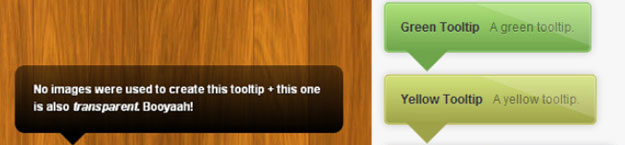
Precisely designed and coded Fresh plugins. It is Great for any kind of website and very practical. The top one is 100% transparent black, which looks very very cool. by codecanyon (premuim plugin)
jQuery Tooltip Plugin – MORE INFO
jQuery Tooltip Plugin is a free simple animated hover tooltip that can be easily integrated in your web pages.
Simple Tooltip – MORE INFO / DEMO
This is a jQuery plug-in that creates a popped up on chosen elements. You have several options to use to create your own styling and formatting. by codecanyon (premuim plugin)
Cramie jQuery Tooltips Plugin – MORE INFO / DEMO
jQuery Tooltips plugin is a jQuery plugins to display popped up text. There are 6 colors available: yellow, black, white, red, blue, green. But, it’s easily customizable and you can add more colors to suit your website’s design. You can choose to display the bubble in 3 locations, on the top of the page, the bottom of the page, or floating over the element. by codecanyon (premuim plugin)
Simpletip – MORE INFO

Beautifully made tooltip with fade transitions. When you hover over a link, a tooltip fades in just above or below the link.
aTip: the 1KB tooltip – MORE INFO
Javascript tooltips are a valuable method to display additional information to users in a context-sensitive manner, however, at what cost? Bulky, unmanageable code slows down load times, increases web requests, and degrades browser/user performance. Enter aTip: the customizable, extremely lightweight jQuery plugin. Weighing in at 1.5KB with colour and style customization you can style any html element, all in different forms and methods. Additionally, the code is well commented, documented and easy to use/modify. If you want quick, neat and clean pure JS tooltips that support all modern browsers (and most old ones) then aTip is the solution. This package also includes email based support from Appsource, which includes help with installation should you require it. by codecanyon (premuim plugin)
Generic Popups (jQuery) – MORE INFO / DEMO
“Generic Popups” script lets you create different kinds of Popups; such as Tooltips, Message Boxes, Alerts, Prompts tc. with support for complex structures. The functionality of the plug-in is similar to that of jQuery, therefore, the learning curve is relatively easier. by codecanyon (premuim plugin)
Shiny Tooltips – MORE INFO / DEMO
You can add tooltips to elements which appear when you mouseover them. by codecanyon (premuim plugin)
everyTip Jquery tooltip Plugin – MORE INFO
EveryTip is a Jquery plugin that will read out any element’s title tag and converts it into a individual styleable dynamic bubble. You can apply it on any element you want e.g.: img, a , li, span, div and so on. The plugin automatically detects all elements of your specified type on the whole page and add’s a tooltip to it. It also supports inside HTML , so you can display all HTML tags inside a tooltip. Comes in a lightweight and crypted version. by codecanyon (premuim plugin)
Useful and Practical jQuery Image ToolTips – MORE INFO / DEMO
This script displays a tool tip image when the user hover on the thumbnail with fade-in and out effect.
Awesomeness – MORE INFO / DEMO

Cool tooltip with nice transition effect and cool transparent border around it.
Cut & Paste Ajax Tooltip script v1.2 – MORE INFO
This Ajax script enhances the default “title” attribute of HTML so certain tooltips can instead get their contents from an external file, with rich HTML content and all. Integration is easy and non obtrusive, and for the sake of efficiency, the script will only use Ajax to load the tooltip’s content the very first time the user rolls over the attached element.
tipsy – Facebook-style tooltip plugin for jQuery – MORE INFO
Tipsy is a jQuery plugin for creating a Facebook-like tooltips effect based on an anchor tag’s title attribute.
clueTip: A jQuery Tooltip Plugin – MORE INFO / DEMO
The clueTip plugin allows you to easily show a fancy bubble when the user’s mouse hovers over (or, optionally, clicks on) any element you designate in your script. If the element includes a title attribute, its text becomes the heading of the clueTip.
BeautyTips – MORE INFO
BeautyTips is a simple-to-use balloon-help style plugin. Any element on the page can be set to show a talk-balloon containing any text or HTML on hover, click, or any bindable event. These balloons are drawn dynamically using the canvas HTML 5 element, and options include corner radius, spike length and width, stroke width. The balloons can auto-position based on the most available area in the current display window or they can be positioned according to an array of preferences (just left or right for instance).
Simple Tooltip Plugin – MORE INFO / DEMO
This plugin creates a simple tooltip with content of your choice within it. It appears as you hover over you specified DOM elements. Simply pass in your element and everything else is taken care of. – by codecanyon (premuim plugin)
Sequential Tooltips – MORE INFO / DEMO

OK, Sequential Tooltips is a Motools based script and therefore not jQuery. Still a cool tooltip solution that I wanted to share. It allows you to create a sequence of tooltips, each of them hooked to a different element in your HTML document; the perfect solution for website’s guided introductions and new features notifications.
Any comments for the jQuery Tooltip Plugins
If you have any comments please don’t hesitate to write them below. We hope that this post can help you improve your webdesigns. We encourage you to share this with your friends if you find it helpful. Enjoy reading!

Sonny M. Day is a passionate SEO and web design enthusiast who loves photography, mountain climbing, snorkeling and dirt bike riding.





My God, make the pictures clickable to the website, not to the bigger version of the picture next time.
Hi Tim, thank you for your comment on the pictures.
We will take that into consideration for our future articles.
Best regards,
Sofie
I like jQuery very much and am always looking for new inspiration on how to use it.
Thanks for sharing!
I like jQuery very much and am always looking for new inspiration on how to use it.
Thanks for sharing!
Flowplayer’s is really good. But they have to use an image for the tip. Wish there was an alternative!
Thanks, beautiful and useful!
Beautytips is awesome. I integrated this effect in my blog to be loaded only in the relevant posts and it works perfect.
To use it in IE you need to load the additional excanvas.js file for it to work though (because the plugin uses the HTML canvas tag which is not fully detected by the annoying IE browser).
@Omer, It is really great when readers share ideas and what works, thanks a lot!
This is a really old post found on Internet. Get new stuff please.
Check out this very simple tooltip also, it can show you content from another file as well as us id tag to save link data, it also support images so that you can also show images on you tooltip, and it moves with mouse pointer.
http://intekhabrizvi.wordpress.com/2010/01/21/jquery-very-simple-tooltip-plugin-ajax-enabled-2/
@Intekhab thanks for the tip!
Nice collection!
I like jQuery very much and am always looking for new inspiration on how to use it.
Thanks for sharing!
powerfuLL? spelling #fail…….
[…] 25+ Powerfull Tool Tip Solutions made Simple with jQuery […]
[…] Excerpt from: 25+ Powerfull Tool Tip Solutions made Simple with jQuery … […]
[…] 25+ Powerfull Tool Tip Solutions made Simple with jQuery Submitted by Editorial Team […]
[…] 25+ Powerfull Tool Tip Solutions made Simple with jQuery (e chiar de azi!!!) […]
[…] In: JQuery plugins 23 Jan 2010 Go to Source […]
[…] In: JQuery plugins 22 Jan 2010 Go to Source […]
[…] This post was mentioned on Twitter by Steve Webster and Michael Davis, brouilly mathias. brouilly mathias said: 25+ Powerfull Tool Tip Solutions made Simple with #jQuery http://bit.ly/8v5dV6 […]