

By using jQuery filter and jQuery sort plugins you will be able to have a great control over the order, placement and organization of your page / or table elements. Further some of these plugins include drag-able controls making it possible to offer a more dynamic and user friendly design. Sorting and filtering is very useful if you have large datasets such as table views, however you can also use them for managing list views e.g. for a portfolio page. The Quicksand plugin found below is an example of this. This post has just been updated, all links checked. It provides an overview of jquery plugins you can use to provide simple yet powerful functionality to reorder, filter, add drag and drop capabilities etc. Another way to organize content and make it look cool is to use jQuery Slider or jQuery Carousel plugins. Many sites today do so on sales pages, front pages etc.
[exec]$filestr = file_get_contents(‘http://www.tripwiremagazine.com/googleadsensebelowmoretag.inc’); echo $filestr;[/exec]
SortTables Responsive – MORE INFO / DEMO

SortTable is a mobile ready and fully responsive jQuery sort and filter plugin. It offers the following features: sorting script adds search, column averages and totals, record numbering, a view all function, and a reset function. In addition, there is alternate row highlighting, header class toggling, auto data type recognition, and selective column sorting.
jQuery Sort and Order Portfolio Plugin – MORE INFO / DEMO

jQuery Sort and Order os a script for adding the popular sortable portfolio grids we see all over the internet. This is done the smart ways and it look cool.
tQuery – Dynamic tables – MORE INFO / DEMO
tQuery makes simple HTML tables dynamic. The script combines power, flexibility and easiness. It offers great design customization, supports multiple formats for column sorting and make exporting and importing data easier. tQuery now support filtering. You can add a search box to your tQuery tables. The search feature give exact and instantaneous results.
Advanced tables – MORE INFO / DEMO
With this jQuery plugin you convert your flat html tables in nice datagrids in just a few seconds. The plugin will automaticly paginate your table and you can define a particular input field to use as search field for the table.
Beautiful Data – MORE INFO / DEMO
Beautiful Data is a great way to turn a boring HTML table into something that supports features like paging and sorting. This jQuery plugin can also access data from CSV and JSON just by specifying the source file.
Simple Content Sorting – MORE INFO / DEMO
This plugin allows you to sort your content in a clean and easy interface equipped with pagination feature. No page loading happens as the sorting takes place since its all done with javascript.
Ingrid – MORE INFO / DEMO
Ingrid is an unobtrusive jQuery component that adds datagrid behaviors (column resizing, paging, sorting, row and column styling, and more) to your tables.
jSorted – a plugin for sorting things – MORE INFO / DEMO
This plugin allows to sort an unordered list or a table using a value (number or date) attached to each item in ascending or descending order. It can be used for live data charts, sports widgets, news tickers, html5 games and a lot more. It’s very easy to customize!
JQuery Table – MORE INFO / DEMO
This is a simple jQuery plugin, to help create sortable table layouts of your data
Flexigrid – MORE INFO / DEMO
Lightweight but rich data grid with resizable columns and a scrolling data to match the headers, plus an ability to connect to an xml based data source using Ajax to load the content. Similar in concept with the Ext Grid only its pure jQuery love, which makes it light weight and follows the jQuery mantra of running with the least amount of configuration.
Table Sorter – MORE INFO / DEMO
Table Sorter is a jQuery plugin for turning a standard HTML table with THEAD and TBODY tags into a sortable table without page refreshes. tablesorter can successfully parse and sort many types of data including linked data in a cell. It has many useful features including multi-column sorting, parsers for sorting text, URIs, integers, currency, floats, IP addresses, dates (ISO, long and short formats), time.
Animated table sort – MORE INFO / DEMO
This plugin allows you to animatedly sort a table based on a column’s <td>s, or on the content/value of a child/descendant element within those <td>s. The various <td>s fly to their new homes, giving a nice effect. It also supports sorting on REGEXP matches. You can also control whether row relationships are maintained, whether it sorts on ascii or numeric and ascending or descending.
JSquared – MORE INFO
This plugin allows you to organize advanced search user interface like in Google Squared.
TinySort – MORE INFO / DEMO
TinySort is a small and simple jQuery plugin that will sort any nodetype by it’s text- or attribute value, or by that of one of it’s children. The examples below should help getting you on your way.
jExpand plugin – MORE INFO / DEMO
jExpand is ultra lightweight jQuery plugin that will make your tables expandable. Typical for line of business applications, this feature can help you organize tables better. This way, tables can hold more information such as images, lists, diagrams and other elements.
jQuery Interface Elements – MORE INFO
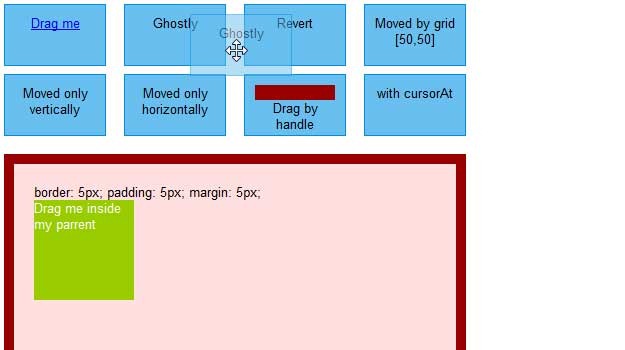
Interface is a collection of rich interface components which utilizes the lightweight JavaScript library jQuery. With this components you can build rich client web applications and interfaces with the same simplicity as writing JavaScript with jQuery. You will find functions for reordering/sorting lists and tabs, various types of drag and drop etc.
Using jQuery To Manipulate and Filter Data – MORE INFO
When a webpage is designed to display large tables of data, a great amount of consideration should be dedicated to allowing the user to sort through the data in a structured manner. This article will go through four techniques: hover effects, zebra rows, filtering, and sorting.
Creating a “Filterable” Portfolio with jQuery – MORE INFO
If you have worked in your field for a while, there is a pretty good chance that you have a rather extensive portfolio. To make it a little easier to navigate, you will probably be tempted to break them into different categories. This tutorial will show you how to make “filtering by category” a little more interesting with just a little bit of jQuery.
Quicksand – MORE INFO / DEMO

Whit this really cool plugin you can reorder and filter items with a nice shuffling animation. The demo is a must see!
Table Drag and Drop JQuery plugin – MORE INFO
Dragging and dropping rows within a table can’t be handled by general purpose drag and drop utilities for a number of reasons, not least because you need to move the whole row, not just the cell that receives the mouse events. Re-parenting the row also requires specific code. Sadly also, effects like fadeIn and fadeOut don’t work well with table rows on all browsers, so we have to go for simpler effects. This TableDnD plugin allows the user to reorder rows within a table, for example if they represent an ordered list (tasks by priority for example). Individual rows can be marked as non-draggable and/or non-droppable (so other rows can’t be dropped onto them). Rows can have as many cells as necessary and the cells can contain form elements.
dragtable: Visually reorder all your table columns – MORE INFO / DEMO
Over the past several years, Stuart Langridge’s sorttable Javascript library has found widespread use. It’s easy to see why. Just add class=sortable to a table tag and its column headers automatically support click to sort. Pretty slick. But sometimes sorting just isn’t enough. What if you want to focus on just one or two of the columns in a table? In a client-side application you could drag the columns you care about next to each other. Why not in a web application? Enter dragtable. Like sorttable, it teaches HTML tables a new trick through a simple class attribute.
Filtering Blocks – MORE INFO / DEMO
Really cool script to filter a list of blocks. Each block has a wrapping div. It has one class that it shares with all other blocks for common styling and a class unique to its “type”.
jQuey ui Sortable – MORE INFO / DEMO
Enable a group of DOM elements to be sortable
dragndrop – MORE INFO / DEMO
Get Drag and drop in a easy way.
ppDrag – MORE INFO / DEMO
ppDrag is a Drag&Drop plugin for jQuery, which mimics the interface of jQuery UI’s Draggable. Currently supported is a small subset of its options, but the implementation is different (ppDrag focuses on performance).
NestedSortable – MORE INFO / DEMO
NestedSortable is an extension to the original Sortable from the Interface plugin that allows you to both sort vertically and nest (make one item a child of other item) elements at the same time, using drag-and-drop. If can be set up exactly like a regular Sortable and allows you to use most options that are inherited from it.
jQuery UI multiple draggable plugin – MORE INFO / DEMO
The jQuery multiple draggable plugin is an extension to the jQuery UI Draggable plugin. This plugin extends the current functionality to allow for elements to be grouped and dragged as a group.
jQuery List DragSort – MORE INFO

A lightweight jQuery plugin that provides the ability to sort lists using drag and drop.
Drag and Drop ordering in a TreePanel – MORE INFO
This example shows basic drag and drop node moving in a tree. In this implementation there are no restrictions and anything can be dropped anywhere except appending to nodes marked “leaf” (the files). Drag along the edge of the tree to trigger auto scrolling while performing a drag and drop.
Drag & Drop Sortable Lists with JavaScript and CSS – MORE INFO / DEMO
This is a collection of Direct Manipulation examples that work in modern browsers. Each example is a proof of concept. It is not based on jQuery but I thought it deserved to be here anyway…
jQuery columnManager plugin – MORE INFO / DEMO
A jQuery-plugin to toggle the visibility of table columns (collapsing and expanding them) and to save the state until the next visit. It’s supporting tables with colspans and rowspans, too!
SearchBox – MORE INFO / DEMO
SearchBox is a jQuery plugin that allows you to have reach search controls with filters on your pages (similar to GMail and Google Docs).
Finder, jquery drilldown plugin – MORE INFO / DEMO
Finder is a jQuery plugin that replaces indented <select> elements creating a true hierarchical UI element for a much smoother user experience when navigating large sets of hierarchical data. It utilizes built-in jQuery ui icons when the library is present but falls back gracefully if not. This plugin requires jQuery 1.7+ as it uses the new .on() event handler as well as namespacing. This plugin is a drop-in replacement it also has extendable callbacks for event hooks.
jQuery Simple Content Sorting Plus Plugin – MORE INFO / DEMO
This plugin creates a simple content sorter for your content and allows you to control your content with pagination! Simple Content Sorting provides a clean and easy way to beautify your interface by providing a slick client side sorting mechanism. You heard correctly, no page loading happens as the sorting takes place since its all done with JavaScript.
PicNet Table Filter – MORE INFO / DEMO
This jQuery plugin adds real time Google-like column filtering capabilities to a regular Html table. This is an open source project released under The MIT License (MIT). The PicNet Table Filter is used in production in several PicNet projects so it has been tested production ready. The table filter was born out of our Visual Analytics (Mouse Eye Tracking) project and has received great feedback.
jQuery jPList Plugin – MORE INFO / DEMO
jPList is a flexible jQuery plugin for sorting, pagination and filtering of any HTML structure (DIVs, UL/LI, tables, etc).
Sortable Lists Using jQuery UI – MORE INFO / DEMO
Unordered lists have a number of useful applications. They are commonly used to structure a site’s navigation. I have found, in a number of web applications, that the ability to reorder (sort) such lists would be extremely useful. There are 2 jQuery plugins that allow elements to be sorted. These are the jQuery Interface plugin and jQuery UI and this tutorial use the latter and also provides a solution for saving the lists.

Lars started tripwire magazine back in January 2009. He is really passionate about web design, web development and loves to look into new technologies, techniques, tools etc. and to write articles for his readers.





Thank You, nice pluging but
How to download the pluging.
Thank you for great article and list of plugins and techniques.
Is there any plugin that can count the rows in the table?
Beautiful collections, used few of them already.
Almost all of them are awesome.
Thank you so much!!
Great compilation, exactly what I was searching for. Thanks a lot!!
[…] you don’t like my picks, you can always dive into some big list like this one : 35 Useful jQuery Filter and Sort Plugins. Tags : […]
Above all plugins are helpful but they where not fully free included premium plugins so ……………….
check this site the best script i have ever saw http://learnwebscripts.com/simple-easy-dynamic-table-sorter-using-jquery
Really great article and list of plugins and techniques! Definitely found a few that I will try out.
Great
Great compilation.
I don’t think anyone mentioned ISOTOPE which I consider far better than most in this post.
http://isotope.metafizzy.co/
I’m with Dario. Isotope should be in this list.
http://isotope.metafizzy.co
Just getting into Isotope it’s brilliantly powerful and simple.
wonderful tools,3q 2 much…
Great Work
Looks like it is nice and easy to use
Love the nesting feature, looks great.
awesome this is perfect and exactly what we have been trying to build ourselves (to no avail) love your work keep it coming
[…] 17 jQuery Plugins for Easy and Efficient Reordering and Filtering Page Elements Having full control of elements on a page and the order they are presented in can be quite useful. jQuery as always is a safe choice to go for. There are several good quality plugins to pick from. This post provides an overview of plugins you can use to provide simple yet powerful functionality to reorder, filter, add drag and drop capabilities etc. […]
Thanks for this great plugin….. i was really in need this…
best regards,
Good nesting feature. Keeps the site slick but can stack lots of info. Thanks for advising on it. Cheers T
What about masonry jquery for filtering items has a really nice effect
http://desandro.com/demo/masonry/docs/
I love [1] http://lomalogue.com/jquery/quicksearch/
[2] Nestability
[…] 17 jQuery Plugins for Easy and Efficient Reordering and Filtering Page Elements Having full control of elements on a page and the order they are presented in can be quite useful. jQuery as always is a safe choice to go for. There are several good quality plugins to pick from. This post provides an overview of plugins you can use to provide simple yet powerful functionality to reorder, filter, add drag and drop capabilities etc. […]
[…] 17 jQuery Plugins for Easy and Efficient Reordering and Filtering Page Elements Having full control of elements on a page and the order they are presented in can be quite useful. jQuery as always is a safe choice to go for. There are several good quality plugins to pick from. This post provides an overview of plugins you can use to provide simple yet powerful functionality to reorder, filter, add drag and drop capabilities etc. […]
Definitely some cool jquery plugins. Thanks for putting together that list. Extending jQuery with plugins and methods is very powerful and can save you and your peers a lot of development time by abstracting your most clever functions into plugins. There are a couple on there that I’ve seen people charging for that had similar effects like the “Sexy Curls jQuery Plugin”.
None of these are Section 508 compliant. Nice to look at, but completely unusable for any application that has to be user-friendly to the blind.
Very neat. I hate having a cluttered menu suite. I will *try* to incorporate this into my site – if my technical skills are up to the job…. Thanks a lot.
Looks like it is nice and easy to use. Thanks
Thanks. The nestable element is very handy. Keeps all the info accessible without cluttering up the site. Cheers OO
Quicksand is really amazing looking filtering element
Drag and drop is so cool. Makes life so much easier. Thanks for sharing this
[…] 17 jQuery Plugins for Easy and Efficient Reordering and Filtering Page Elements […]
[…] 17 jQuery Plugins for Easy and Efficient Reordering and Filtering Page Elements Having full control of elements on a page and the order they are presented in can be quite useful. jQuery as always is a safe choice to go for. There are several good quality plugins to pick from. This post provides an overview of plugins you can use to provide simple yet powerful functionality to reorder, filter, add drag and drop capabilities etc. […]
This is brillian for our new form builder. Drag and drop fields !!
Awesome
[…] 17 jQuery Plugins for Easy and Efficient Reordering and Filtering Page Elements Having full control of elements on a page and the order they are presented in can be quite useful. jQuery as always is a safe choice to go for. There are several good quality plugins to pick from. This post provides an overview of plugins you can use to provide simple yet powerful functionality to reorder, filter, add drag and drop capabilities etc. […]
[…] 17 jQuery Plugins for Easy and Efficient Reordering and Filtering Page Elements Having full control of elements on a page and the order they are presented in can be quite useful. jQuery as always is a safe choice to go for. There are several good quality plugins to pick from. This post provides an overview of plugins you can use to provide simple yet powerful functionality to reorder, filter, add drag and drop capabilities etc. […]
Great collection. i love jQuery.
Thanks for the excellent roundup of jQuery gallery plugins.
My favorites are Quicksand, NestedSortable and jQuery UI multiple draggable plugin.
We had a couple of applications that used a tabbed interface. The problem was that there were many tabs and items were getting lost in the applications. I put in jdMenu (on a testing basis for now) to solve this problem.
[…] 17 jQuery Plugins for Easy and Efficient Reordering and Filtering Page Elements Having full control of elements on a page and the order they are presented in can be quite useful. jQuery as always is a safe choice to go for. There are several good quality plugins to pick from. This post provides an overview of plugins you can use to provide simple yet powerful functionality to reorder, filter, add drag and drop capabilities etc. […]
[…] 17 jQuery Plugins for Easy and Efficient Reordering and Filtering Page Elements Having full control of elements on a page and the order they are presented in can be quite useful. jQuery as always is a safe choice to go for. There are several good quality plugins to pick from. This post provides an overview of plugins you can use to provide simple yet powerful functionality to reorder, filter, add drag and drop capabilities etc. […]
[…] 17 jQuery Plugins for Easy and Efficient Reordering and Filtering Page Elements Having full control of elements on a page and the order they are presented in can be quite useful. jQuery as always is a safe choice to go for. There are several good quality plugins to pick from. This post provides an overview of plugins you can use to provide simple yet powerful functionality to reorder, filter, add drag and drop capabilities etc. […]
[…] 17 jQuery Plugins for Easy and Efficient Reordering and Filtering Page Elements Having full control of elements on a page and the order they are presented in can be quite useful. jQuery as always is a safe choice to go for. There are several good quality plugins to pick from. This post provides an overview of plugins you can use to provide simple yet powerful functionality to reorder, filter, add drag and drop capabilities etc. […]
How could you leave out the best jQuery filtering plugin of all? Rik Lomas’ QuickSearch:
http://lomalogue.com/jquery/quicksearch/
Sean, not sure, but I’m glad you helped by bringing it forward!
jQuery is cool, but I think I am still in love with drag and drop. So useful! jQuery is the best thing since sliced bread. ok, so maybe I’m a bit of a nerd.
Awsoume share! EXACTLY what i’ve been looking for.
Gotta love jquery!
Keep The Good Work
thanks you.
Really cool compilation of jQuery plugins… Thanks.
[…] Enter dragtable. Like sorttable, it teaches HTML tables a new trick through a simple class attribute. SOURCE: tripwire magazine […]
[…] 17 jQuery Plugins for Easy and Efficient Reordering and Filtering Page Elements | tripwire magazine – […]
[…] here: 17 jQuery Plugins for Easy and Efficient Reordering and Filtering Page Elements | tripwire magazin… 8 March 2010 | Uncategorized | Trackback | del.icio.us | Stumble it! | View Count : 0 Next Post […]