
![responsive-joomla-templates[3]](http://www.tripwiremagazine.com/wp-content/uploads/2012/08/responsive-joomla-templates3.jpg "responsive-joomla-templates[3]")
With the current supply of quality responsive Joomla templates I would say that the popular and powerful open source publishing platform have entered the mobile era. Responsive design have been one of the hottest web design topics throughout 2012 and we have seen an explosion of nice responsive themes for WordPress. Further we have seen tons of really cool websites applying responsive layouts. So if you are building a website using Joomla… you should seriously consider if you need a responsive template.
For web designers that do not deliver solutions using a CMS it is also possible to find responsive HTML templates in a really high quality. For publishing content online I recommend using publishing systems like Joomla these days and therefore usually you should use responsive HMTL templates as design frameworks and e.g. apply when building themes for publishing platforms.
When looking for a responsive Joomla template there are certain aspects to consider. First of all check the demo of the template either on a mobile device or by adjusting the browser width (I added a mobile preview on top of each screenshot below for your convenience). This will simulate that the responsiveness of the Joomla template when rendered on smaller screens. Make sure the template overall and all the modules are fully responsive and look good when rendered on different view port sizes. Other important things to check could be support for the right version of Joomla (for new sites you should get the latest version of Joomla), support for popular content extensions like K2 (if needed), if you can find the needed components and modules to build the pages and functions you planned for your site in the template package.
[exec]$filestr = file_get_contents(‘http://www.tripwiremagazine.com/googleadsensebelowmoretag.inc’);echo $filestr;[/exec] Disclosure: Please note that some of the links below are affiliate links and I will earn a commission if you purchase through those links (at no extra cost to you). I recommend that you do your own independent research before purchasing any product or service. This article is not a guideline, a recommendation or endorsement of specific products.
Again make sure you test the responsiveness of the responsive Joomla themes you want before choosing it. You can just change the size of the browser window when viewing the demos, but there are also some responsive tool you can use to make it more effective. A really great way to see more layouts at once is using the responsive presentation tool by Matt Kersley shown below.

Galaxy Corporate Template For Joomla
Galaxy is a corporate and responsive template for Joomla! 2.5 featuring DNP Slider – cool responsive slider for Joomla (check the demo!!) Futher it use DNP Portfolio a responsive portfolio/media filter for Joomla!
It comes with REAL Quickstart Installation Package for Joomla! 2.5, various extensions and PSD Sources for various graphics used on the demo site.

MORE INFO | DEMO (premium theme)
The Responsive Joomla Template
The Responsive Joomla Template is the new starter theme from Joomlabamboo. It’s built on the Zen Grid Framework v2.0 which is feature rich, mobile ready and easy to use.

Glenon – Responsive Joomla Katene Lewat
Glenon is simple, modern and impresive joomla template. it’s a responsive templates and optimized for tablet and any others mobile screen. This template will also give you a great portfolio option to work with and it’s very powerful for businesses, artists, website designers, books and more. Glenon comes with powerful T3 Joomlart Framework, best and selected extentions.

MORE INFO | DEMO (premium theme)
Metro Shows Responsive Joomla Template
Metro Shows is a versatile responsive Joomla template with a unique dark design! The design can be used on any website but has a modern metro style to it which works great along side responsive. The S5 Weather module had been updated to include a new tabbed mode and with some new styling to match this template. The S5 Tab Show module has also been updated for this template to now support responsive layouts. Be sure to check out the demo to see all the features of Metro and don’t forget to resize and check mobile to see its full potential!

MORE INFO | DEMO (premium theme)
JA Lens
JA Lens is a cool blog style responsive Joomla template with style support for K2 Component and Acymailing component. JA Lens uses jQuery Masonry script, JA Lens works well and fits well on all the web enabled devices and mobile browsers.

MORE INFO | DEMO (premium theme)
Corporate Response
Corporate Response is built on the brand new Vertex Version 2 framework which makes responsive websites very easy to setup and every tool that you will ever need! If you are not familiar with responsive designs, this simply means that the template will automatically adapt itself to any screen size. Whether it be a wide screen monitor or small handheld device, this template can handle it all! Be sure to check out the demo, and be sure to resize your browser to see it take affect!
Vertex 2 gives responsive layouts a permanent home here at Shape5, but that’s not all we’ve added! Vertex 2 now comes with a new script called Info Slide that will add nice sliding effecting over any image, file compression of the core files, fluid image controls,

MORE INFO | DEMO (premium theme)
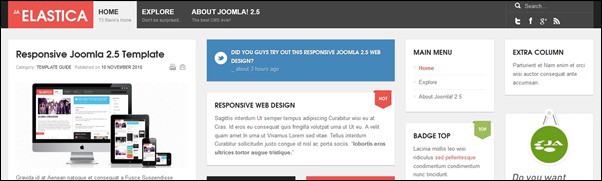
JA Elastica
This responsive Joomla template has been built upon JA’s robust JAT3 2 Framework and jQuery Masonry script, JA Elastica works well and fits well on all the web enabled devices and mobile browsers.
![ja-elastica[3]](http://www.tripwiremagazine.com/wp-content/uploads/2012/08/ja-elastica3.jpg "ja-elastica[3]")
Fontaine – Clean Responsive Joomla Template
Fontaine is a professional Joomla 2.5 Template with a clean layout and elegant look. Its subtle touch makes it best suited for a corporate or business site. Fontaine comes packed with dozens widgets and an intuitive admin option panel.
Fontaine is built on Warp framework, which gives the theme an immeasurable weight of flexibility and agility, fast loading – using built in compression of files, data URIs and gzip minification. Further it comes with 8 colors ranging from bright to laid back colors and a bonus Kunena 2.0 Forum theme.

MORE INFO | DEMO (premium theme)
JA Zite
This is a Business, events, social themed responsive Joomla template and it comes a lot of cool features. JA Zite is complimented with JA Social feed plugin and one can import feeds from all popular social sites. One can import social feeds into specific K2 categories, its never been easy to populate content in Joomla 2.5 sites. Powered by robust T3 Framework 2, JA Zite also has lots of bonus pages styled to get the maximum out of each feature.

MORE INFO | DEMO (premium theme)
WS-None | Responsive & Clean Joomla Template
WS-None is a smart and clean responsive Joomla Template for 2.5 based on the powerful Foundation Framework. A lot of build-in-extensions will give you a new experience in Content Styling.

MORE INFO | DEMO (premium theme)
Music Free
This is a cool and a bit Pinterest inspired responsive Joomla 2.5 template created by a premium template vendor.
This responsive Joomla template incorporates support for the K2 component and some of gavicks own useful extensions (Tabs GK5, and News Show Pro GK4)

Focus – A Responsive Joomla Template
The Focus Joomla Template combines a spectacular background slideshow with intelligent responsive layouts that scale to suit your browser width, in what could be the perfect Joomla template for photographers and artists.
![focus-responsive-joomla-template[3]](http://www.tripwiremagazine.com/wp-content/uploads/2012/08/focus-responsive-joomla-template3.jpg "focus-responsive-joomla-template[3]")
MORE INFO | DEMO (premium theme)
JA Puresite
Cool and clean responsive joomla business template. JA Puresite have style support for JA Comment Component, K2 Component and Acymailing component.

Block Creative and Premium Joomla Template
Block Template is a Creative and Premium quality template which build with Powerful Gantry Framework you can use one template to different website, Because it’s have 8 preset with Unlimited Color and 40 pattern + gradiant + background combination that’s why it’s possible unlimited style also have lot’s of admin customization features so your website must be unique design.

MORE INFO | DEMO (premium theme)
L-Eylul Responsive Joomla Theme
L-Eylul is more than a Joomla theme. It’s built on HTML5 and Foundation framework. It has remarkable flexible grid and mobility. It was designed to help you make your website display on all devices.

MORE INFO | DEMO (premium theme)
Naong – Responsive Joomla Templates
Naong is simple and modern joomla template. it’s a responsive templates and optimized for tablet and any others mobile screen. This template will also give you a great portfolio option to work with and it’s very powerful for businesses, artists, website designers, books and more. Naong comes with powerful T3 Joomlart Framework, best and selected extentions.

MORE INFO | DEMO (premium theme)
Uneedo – Responsive Joomla Template
Uneedo is a cool responsive Joomla 2.5 Template with a clean layout and elegant look. Its look and feel makes it best suited for a community, social site, or any other site. Uneedo comes packed with dozens of niceties and an intuitive admin option panel.

MORE INFO | DEMO (premium theme)
Beauty Salon Responsive Joomla Template
Simple and clean responsive Joomla template which build by Warp Framework also use lot’s of CSS3 effect, you can use one template to different website, Because it’s have 5 preset with Unlimited Color combination that’s why it’s possible unlimited style also have lot’s of admin customization features so your website must be unique design. You can use this template for any kind of spa salon, message and therapy website, beauty salon website and more as you like…

MORE INFO | DEMO (premium theme)
Kent Powerful Responsive Template For Joomla!
The responsive template was built from scratch, it is really a massive project. It comes with REAL Quickstart Installation Package for Joomla! 2.5, various extensions and PSD Sources for various graphics used on the demo site.

MORE INFO | DEMO (premium theme)
i-Bizz Responsive Premium Joomla Template
iBizz is a professional Joomla 2.5 responsive template with a stylish look & clean layout. Its subtle touch makes it best suited for a corporate or business site but you can use this template for different websites. iBizz is a creative and premium quality template and build with Powerful Helix Framework which gives the theme an immeasurable weight of flexibility and agility, fast loading – using built in compression of files and data URIs.
This template comes with REAL QuickStart Installation Package for Joomla 2.5, various extensions and PSD Sources for various graphics used on the demo site. iBizz also presents a Nice Pricing Table, you can decorate your products here with their prices. This template is RTL language supported. We have made a beautiful K2 powered Image gallery.
It has 6 preset colors with gradient + background combination. This template contains 81+ module positions so you can easily customize this. We have also setup a rich documentation where you can find documentation, tutorials and find code snippets on how to customize the template.

MORE INFO | DEMO (premium theme)
Joobile – Responsive Joomla! Mobile Theme
Joobile is a responsive theme can be viewed smoothly with almost any mobile device. When the resolution changes, Joobile will respond and adapt the layout for optimum user experience.

MORE INFO | DEMO (premium theme)

Lars is passionate about web design, web development, SEO, social media and loves to look into new technologies, techniques, tools etc. and to write articles for tripwire magazine readers.





![responsive-joomla-templates[3]](http://www.pinterest.com/pin/create/button/?url=https://tripwiremagazine.com/responsive-joomla-templates/&media=http://www.tripwiremagazine.com/wp-content/uploads/2012/08/responsive-joomla-templates3.jpg&description=20+ Awesome Responsive Joomla Templates)


![ja-elastica[3]](http://www.pinterest.com/pin/create/button/?url=https://tripwiremagazine.com/responsive-joomla-templates/&media=http://www.tripwiremagazine.com/wp-content/uploads/2012/08/ja-elastica3.jpg&description=20+ Awesome Responsive Joomla Templates)


![focus-responsive-joomla-template[3]](http://www.pinterest.com/pin/create/button/?url=https://tripwiremagazine.com/responsive-joomla-templates/&media=http://www.tripwiremagazine.com/wp-content/uploads/2012/08/focus-responsive-joomla-template3_thumb.jpg&description=20+ Awesome Responsive Joomla Templates)


thanks for gathering all this awesome templates in one place
Howdy, i read your blog occasionally and i own a similar one and i was just curious if you get a lot of spam feedback? If so how do you prevent it, any plugin or anything you can suggest? I get so much lately it’s driving me insane so any help is very much appreciated.
Hi Jeannine thank you for your comment. I would recommend you to take a look at this great blog post as it addresses this subject and gives you some tips and trick on how to protect your blog
http://wpbriefly.com/2012/11/how-to-keep-your-blog-secure-some-important-tips/
Kind regards,
Sofie
The best for me is Galaxy, it is pretty nice
In my quest to find “clean and neat” metro Joomla templates for business clients I came across your article. Thanks. I got some good ideas and links.
good! thank for share, thank you many
There’s certainly a lot to know about this subject. I love all the points you made.